
Features
VHDL Auto-Completion
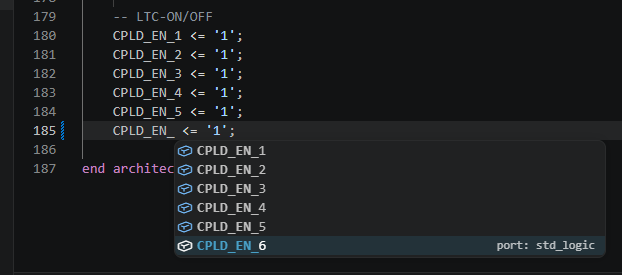
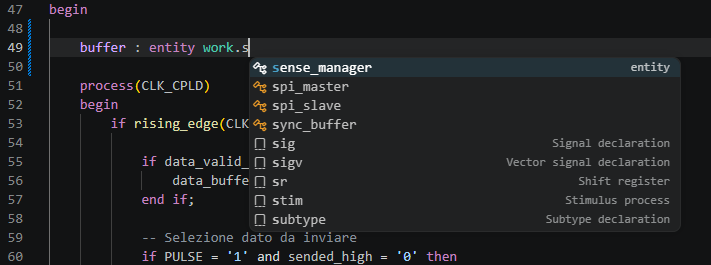
The extension provides smart auto-completion as you type in VHDL files.
Suggested completions:
| Category | Examples |
|---|---|
| VHDL keywords | entity, architecture, signal, process, rising_edge, std_logic, case, when, for, loop (~80 keywords) |
| Local symbols | signals, variables, constants, and ports declared in the current file |
| Entities | workspace entity names (suggested after entity, component, architecture ... of) |
| Packages | package names (suggested after use work.) |
| Package symbols | symbols inside a package (suggested after use work.pkgname.) |
Context-aware filtering: when typing in an entity/component/architecture context, only entity names are shown — VHDL functions like rising_edge are excluded.
VHDL Navigation
Navigate through your VHDL project with full Ctrl+Click support.
Supported navigation:
- entities
- packages
- package symbols
- signals, variables, and constants declared in architectures
- FPGA pin assignments
entity work.uart_txuse work.pulse_pkg.all;Jump directly to the declaration.
VHDL Outline (Document Symbols)
View the structure of your VHDL file in the Outline panel (Ctrl+Shift+O) or editor breadcrumb:
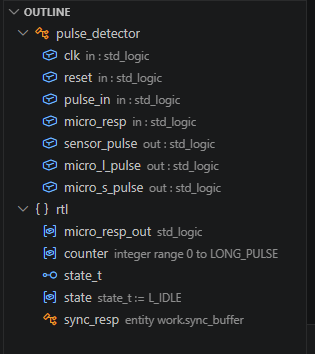
Entities use the Class (orange diamond) icon. Architecture-local signals, variables, constants, processes, and instantiations appear as children under the architecture block.
Supports: entities, architectures, packages, ports, generics, signals, constants, types, labelled processes, component declarations, direct entity instantiations, component instantiations.
FPGA Pin Integration
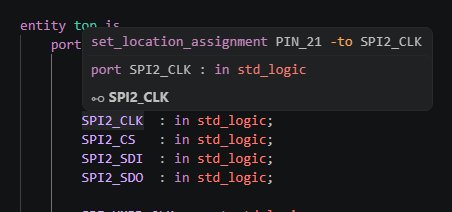
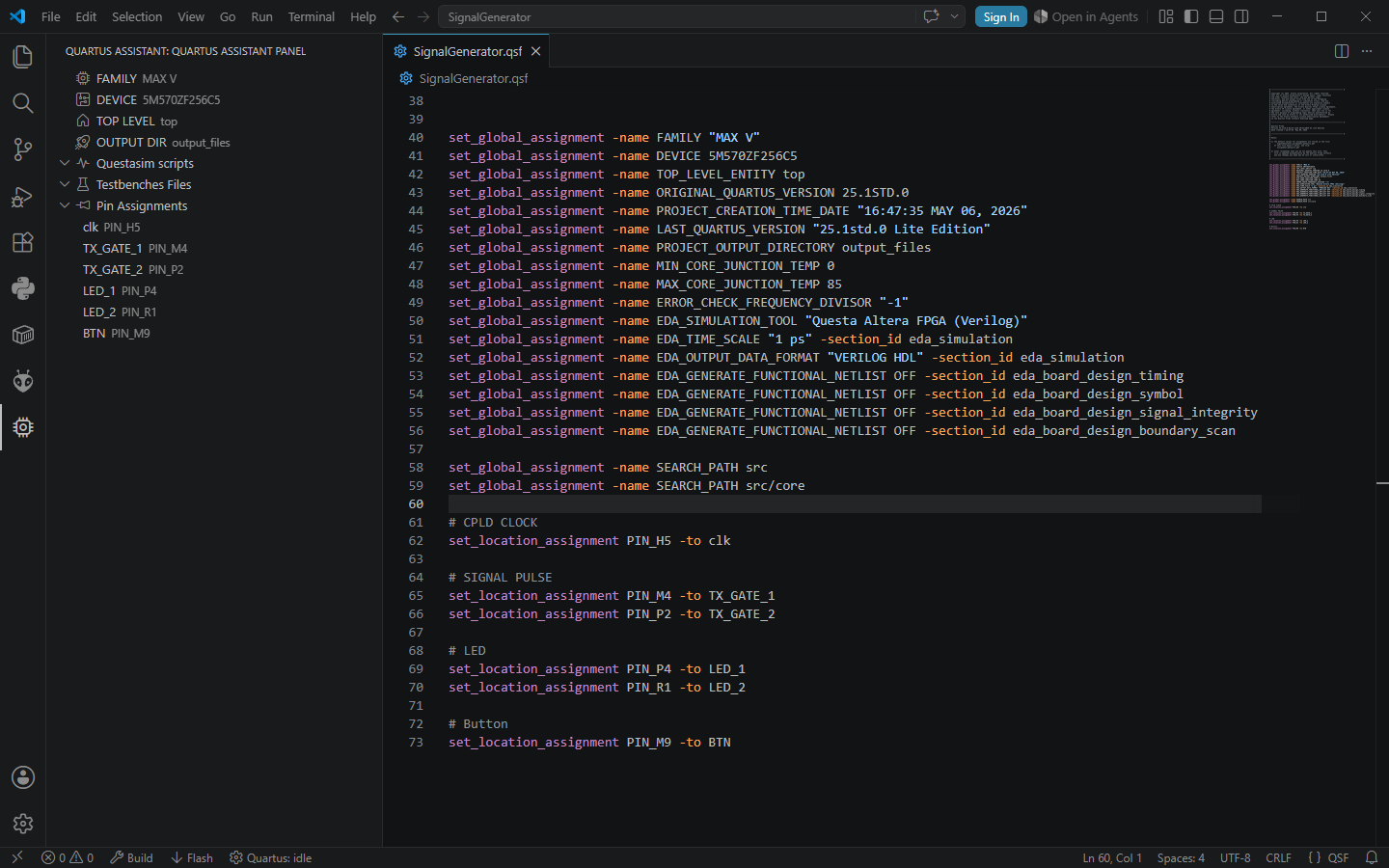
VHDL Essentials understands your .qsf constraints and links them directly to VHDL signals.
Pin Hover Information
Hover a top-level signal to instantly see the assigned FPGA pin.
QSF Navigation
Ctrl+Click on a VHDL signal to jump directly to the corresponding pin assignment inside the .qsf file.
Integrated FPGA-aware navigation between:
- VHDL
- Quartus constraints
- package symbols
Quartus Project Explorer
Dedicated FPGA project TreeView integrated inside VSCode.
Features:
- Top-level entity detection
- Pin assignment explorer (each pin shows blue plug icon)
- Fit resource summary (logic elements, pins, registers, etc. with color-coded usage)
- QuestaSim scripts explorer
- Testbench management
- Left-click on any file → opens it
- Left-click on a pin assignment → opens
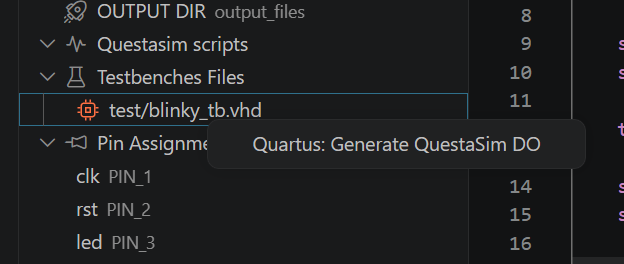
.qsfat the pin line - Right-click on a testbench → Generate QuestaSim DO
- Right-click on a
.dofile → Run QuestaSim simulation
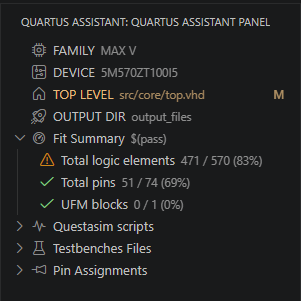
Fit Resource Summary
After a successful (or failed) Quartus build, the tree view displays a Fit Summary section parsed from <output_dir>/<project>.fit.summary. Each resource (logic elements, pins, registers, PLLs, memory bits, etc.) is shown with its usage:
- 🟢 Green check — usage below 70%
- 🟡 Orange warning — usage between 70% and 90%
- 🔴 Red error — usage at or above 90%
The summary is ordered by usage descending (most critical first), and the parent node shows $(pass) or $(error) depending on the Fitter status.
Quartus Workflow Integration
Run your FPGA workflow directly from VSCode.
Supported actions:
- Build
- Flash
- Simulation launch
- Questa
.dogeneration
Integrated status bar controls:

Integrated Build and Flash Output
VHDL Essentials provides integrated build execution and live tool output directly inside VSCode.

Diagnostics
VHDL Essentials validates your code on multiple levels.
FPGA Pin Diagnostics
- A top-level signal has no assigned FPGA pin → Warning
- Constraints are missing from the
.qsf→ Warning - Same
PIN_xxassigned to multiple signals → Error - Same signal assigned to multiple pins → Warning
VHDL Code Linters
- Duplicate declarations — duplicate signal, variable, or port names in the same scope
- Sensitivity list — signals read inside a process but missing from the sensitivity list
- Syntax scopes — unclosed
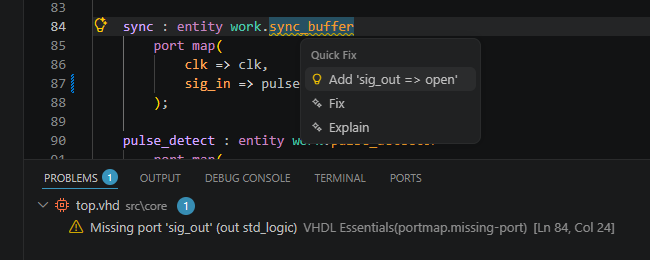
if,process,for/whileloops, mismatchedendlabels - Port map validation — missing ports and undeclared formals detected in direct entity instantiations
- Undeclared identifiers — identifiers used but never declared flagged as errors
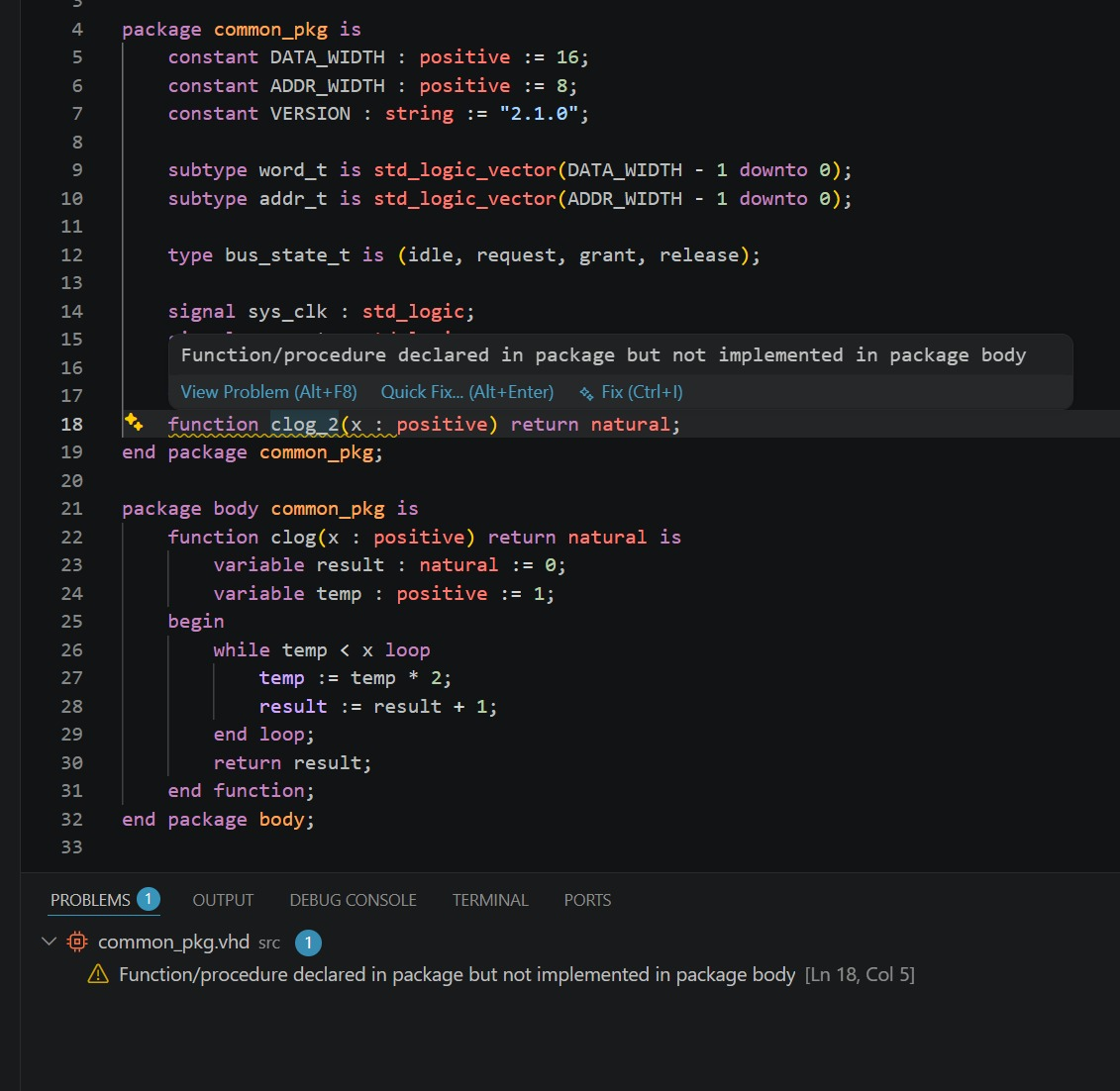
- Package body completeness — function/procedure declared in a package but not implemented in its body
All diagnostics appear in the Problems panel (Ctrl+Shift+M) with clear messages.
Code Actions (Quick Fixes)
Press Alt+Enter on any lint warning to apply an automatic fix:
| Diagnostic | Fix action |
|---|---|
| Missing port in port map | Add portName => open aligned after the last mapping |
| Undefined port in port map | Remove the entire mapping line |
| Duplicate signal/variable/port declaration | Remove the duplicate line |
| Unused signal/variable/constant | Remove the declaration line |
| Undeclared identifier | Add signal/variable/constant declaration with the identifier name |
| Missing/extra signal in sensitivity list | Add or remove the signal inline |
| Duplicate QSF pin assignment | Remove the duplicate line |
| Duplicate QSF signal assignment | QuickPick to choose which line to keep |
| QSF tab/spaces | Normalize to spaces |
| Missing semicolon | Add ; |
Wrong end keyword / name | Suggest correct keyword and name |
| Unclosed scope | Add end <type>; after the block |
else/elsif without if | Wrap in if ... then ... end if; |
when outside case/generate | Wrap in case ... is ... end case; |
| Package function/procedure stub | Generate stub in package body |
Unassigned port without PIN | Generate set_location_assignment stub |
Unused declarations, undeclared identifiers & TODO markers
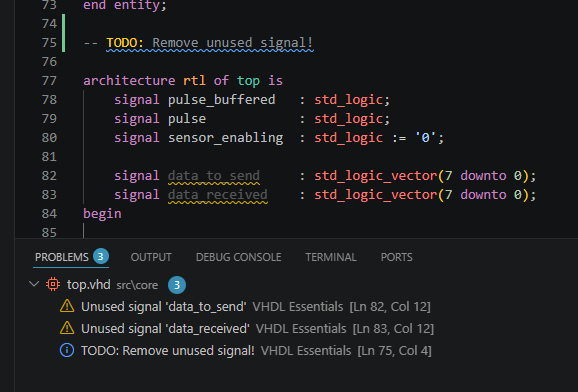
Warns when a signal, variable, or constant is declared but never used (unused names are grayed out at 40% opacity). Detects identifiers used in expressions but never declared — flagged as errors to catch typos and missing declarations early. Scans for TODO, FIXME, HACK, XXX, and NOTE markers inside VHDL comments — shown as Info diagnostics with gold (#FFD700) highlighting.
Declarations inside VHDL comments (-- signal foo...) are correctly ignored by the linter. Package-scoped declarations are excluded from unused-signal checks (consumed cross-file via use work.pkg.all).
Real-Time VHDL Syntax Checking
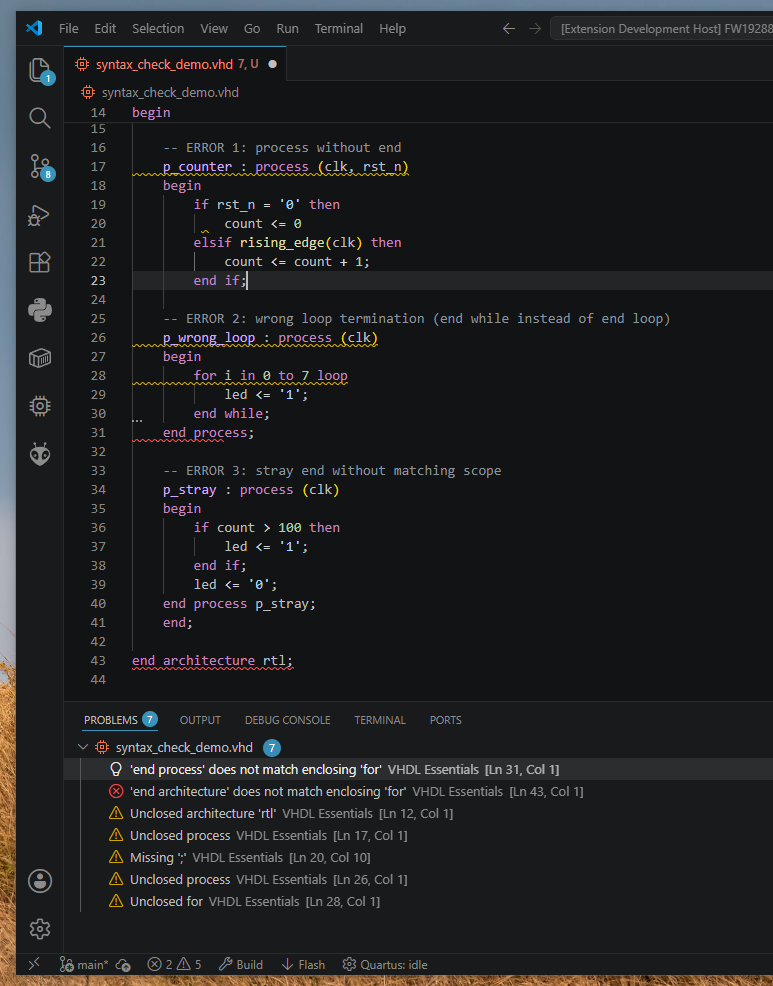
The extension validates VHDL syntax in real time as you type, highlighting errors directly in the editor.
Checked patterns:
- Unclosed scopes — missing
endforif,process,for...loop,while...loop,case,generate,block - Wrong loop termination —
for/whileloops must close withend loop;(notend while;) - Missing semicolons — detected on statement lines (skips component instantiation)
- Unexpected
end— strayendwithout a matching open scope - Function/procedure body — declaration without
isdoes not open a scope - Component instantiation —
label : entity work.xxxrecognized, no false warnings
No configuration needed — works out of the box on all .vhd and .vhdl files.
Semantic Highlighting
The extension provides semantic highlighting for:
- entities
- packages
- imported package symbols
- FPGA pin-aware signals
Highlighting only appears when declarations actually exist inside the indexed workspace.
Automatic Workspace Indexing
Workspace-wide indexing for:
.vhdand.vhdlfiles- VHDL entities
- packages
- package symbols
The index updates automatically when files are created, deleted, or modified.
VHDL Snippets
Type a prefix and press Tab to expand into common VHDL constructs.
| Prefix | Expands to |
|---|---|
entity | Entity declaration with port list |
arch | Architecture body |
pkg | Package declaration |
pkgb | Package body |
process | Synchronous process with async reset |
proc_nr | Synchronous process (clock only) |
proc_comb | Combinational process |
fsm | Finite state machine (register + next-state + output) |
inst | Direct entity instantiation with port map |
comp | Component declaration |
tb | Complete testbench template |
clock | Clock generation (clk <= not clk after 10 ns) |
stim | Stimulus process |
sig | Signal declaration |
sigv | Vector signal declaration |
var | Variable declaration |
const | Constant declaration |
type | Enumerated type declaration |
subtype | Subtype declaration |
case | Case/when statement |
for | For loop |
if | If/elsif/else statement |
func | Function body |
proc | Procedure body |
func_decl | Function prototype (for packages) |
proc_decl | Procedure prototype (for packages) |
forg | For generate |
ifg | If generate |
cnt | Counter with reset and enable |
sr | Shift register |
others | Others aggregate (others => '0'/'1') |
wait | Wait for/on/until |
assert | Assert/report with severity |